Sleep Sound Apps
The 7 best brown noise apps in 2026:
free and paid, compared
Updated
Best brown noise apps: quick picks
Our pick for free brown noise on iPhone and Android
Veil: shape your sound, without ads or loops
Make your brown noise deep and bass-heavy or softer and more textured. Veil's Character, Brightness, Texture and Intensity controls let you shape it to your ear while it plays. Brown noise and all four controls are free, along with precision volume, offline playback and a fading sleep timer. No ads, no account, no subscription required for brown noise.
- Built-in option on Apple devices: Apple Background Sounds offers a free low-pitched sound called Dark Noise, with nothing to install.
- Free mixing, if you accept ads: White Noise Lite lets you mix its recorded brown noise with other sounds. Veil offers mixing and saved mixes with Premium.
Free brown noise, shaped to your ear
Get Veil and make the sound your own. Tune the depth, soften the brightness and set a sleep timer. Your brown noise is generated on your phone, with no recorded loop restarting and no connection needed.
Or listen to brown noise in your browser firstBelow, compare seven apps on how they make brown noise, what you can change, whether brown noise is free, and what you pay for extras.
What brown noise is, in one paragraph
Brown noise is broadband noise with its energy tilted toward the low end, falling off at about 6 dB per octave. Next to white noise it sounds deeper and softer, closer to a distant waterfall or a jet at cruising altitude than to static. That is why people who find white noise harsh reach for it. If you are choosing between colors, white vs pink vs brown covers the differences, brown noise and ADHD covers what the research does and does not show, and you can play brown noise in your browser right now.
Considering a physical device instead? Our white noise machine vs app guide compares Dohm, LectroFan, SNOOZ and Hatch with software on sound, controls, power and travel.
Best brown noise apps at a glance
| App | Its brown noise | What you can change | Free brown noise? | Optional paid upgrades | Platforms |
|---|---|---|---|---|---|
| Veil Shapeable brown noise | Synthesized on the device; no loops | Character, Brightness, Texture and Intensity; Studio custom creation; saved Studio sounds and three-sound mixes (Premium) | Yes, permanently, with its controls; no ads | Optional Premium: $1.99/mo, $9.99/yr, or $19.99 once | iPhone, iPad, Android |
| myNoise Band-by-band control | Brown preset in its White Noise and Co player; sample-based on the web, native engine not documented | Ten frequency-band sliders, hearing calibration | Free tier available; brown-noise access on mobile not confirmed | $19.99 once on iOS (Full Access); Android and web sold separately | iPhone, iPad, Android, web |
| Apple Background Sounds Built in, "Dark Noise" | Built-in system sound, labeled Dark Noise | Volume; equalizer and timer on iOS 26 | Yes, Dark Noise, permanently; no ads | None; built in | iPhone, iPad, Mac, Vision Pro |
| White Noise Lite One of 50 recordings | Recorded track, looped | Pitch, speed, mixing | Yes, permanently, with ads | Paid editions: Full $0.99, Pro $2.99 | iPhone, iPad, Android, Mac, Windows |
| Dark Noise Apple widgets and Shortcuts | Recorded track, looped | Custom mixes, Magic Mixes | Free tier of 8 sounds; brown-noise access not confirmed | Pro: $2.99/mo, $19.99/yr or $49.99 once per its 2023 announcement | iPhone, iPad, Mac, Vision Pro |
| ColorSleep Noise colors, Apple only | Colored noise; production not documented | Timer with fade; shaping controls not documented | Free tier available; brown-noise access and limits not confirmed | $9.99/mo listed; other offers' durations not confirmed | iPhone, iPad, Mac, Vision Pro |
| BetterSleep Inside a sleep suite | Recordings and music, with Smart Mix | Mixing and playlists | Free tier available; brown-noise access not confirmed | Monthly and annual plans; lifetime also available; price varies by offer and platform | iPhone, Android; other Apple devices per its listing |
How the apps were compared
- How the brown noise is made. Synthesized on the device, a recorded track played on a loop, or a sample-based player. This shapes what the app can let you change.
- What you can change about it. Depth, cutoff, band-by-band shaping, pitch, or just volume.
- Whether brown noise itself is free, permanently, on a trial, or unconfirmed. A free download does not establish free brown noise.
- Optional paid upgrades, and which platform each price applies to.
- Platforms. Three of the seven are Apple-only.
Everything above comes from each app's own store page, help center or website on the date in the disclosure, with links in the sources at the end. It is a comparison of published features and prices.
The seven apps, in detail
1. Veil iPhone, iPad, Android
Veil: best for shaping brown noise and creating your own sound
Veil's brown noise is synthesized on your phone while it plays, with no loops, and it comes with controls that reach inside the sound. Character sets how deep it goes: move it toward Deep for heavier bass, toward Clear for more mid-range texture and body. Lower Brightness for a darker, more enveloping sound. Texture sets how lively the grain is. Intensity sets its strength. Set them once and the app remembers them.
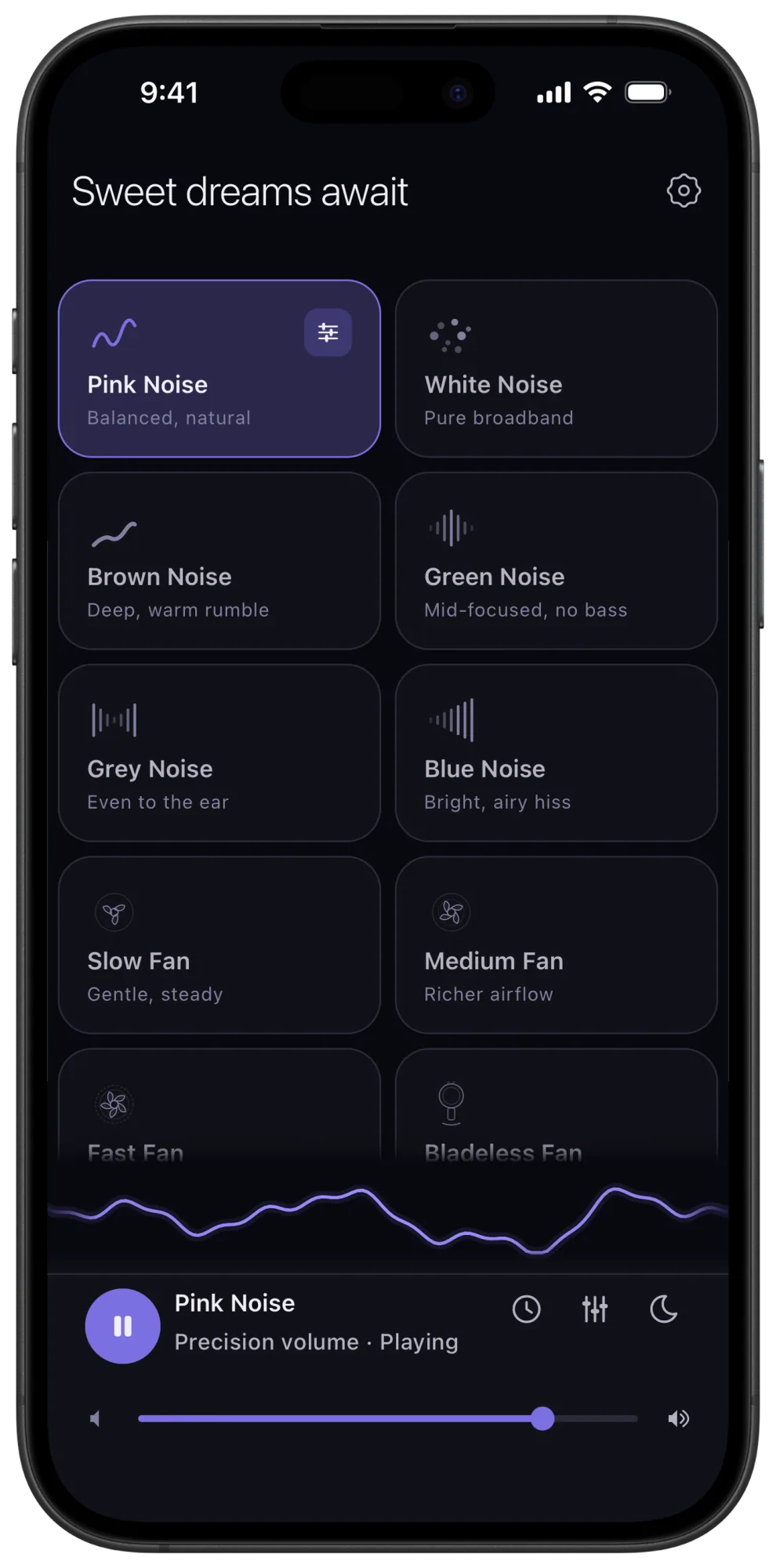
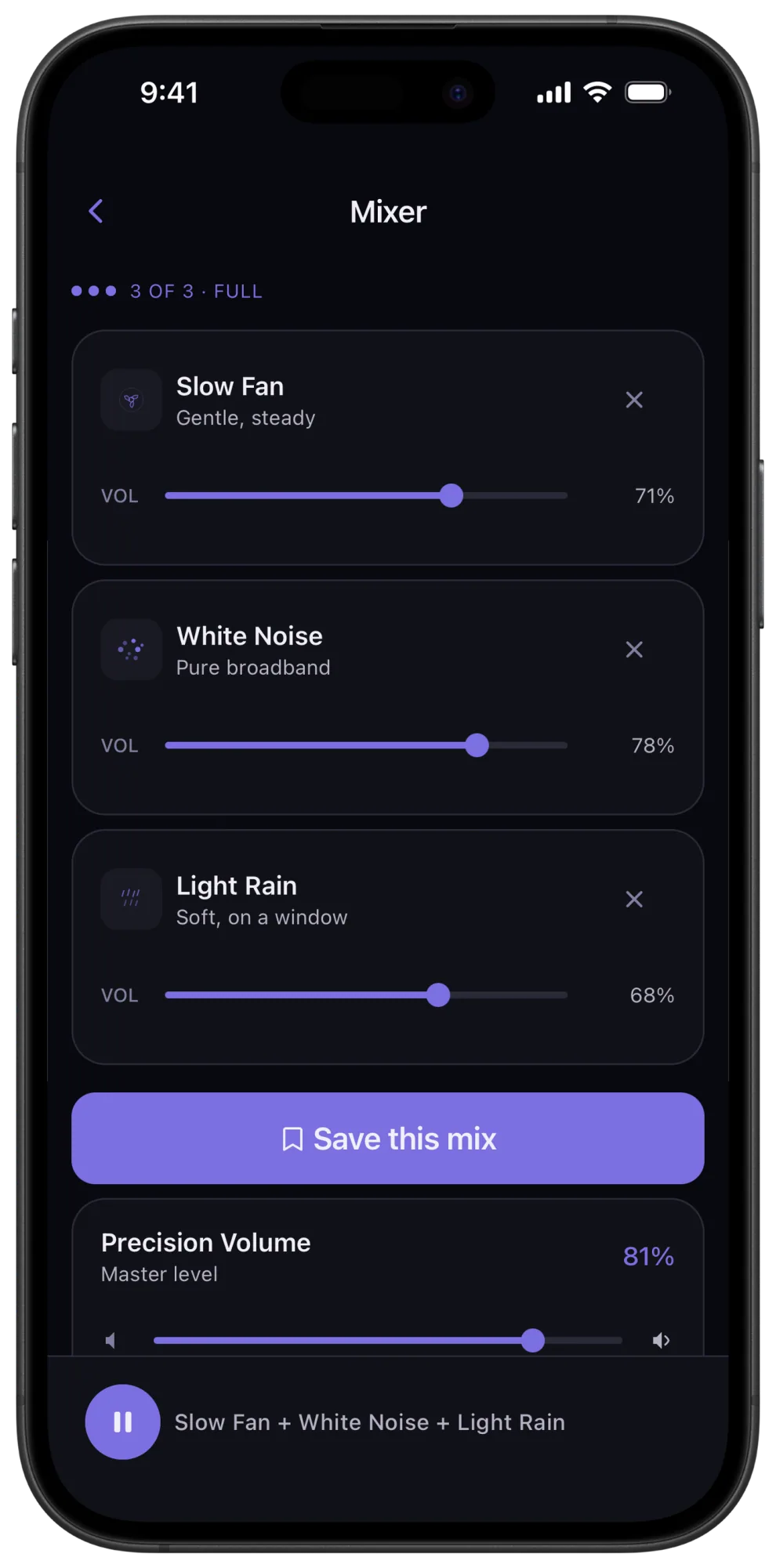
Brown noise is one of Veil's six free sounds, alongside white and pink noise, Slow Fan, Light Rain and Warm Drone, with the sleep timer and fade, the bedside clock and precision volume included, in a refined dark interface built for the nightstand. Premium adds the rest of the library, mixing up to three sounds, and saved mixes. Brown noise under a slow fan is a natural pairing: the fan adds movement, the brown noise adds floor.
Create your own sound in Studio. Veil is our pick for the most customizable sleep sound app: tune the library sounds, then go further with Studio custom sound creation. Start with generated noise or a tuned library sound, then shape a three-point frequency curve and adjust its width. Creating and auditioning a Studio draft is free. Premium lets you save, replay and refine up to six Studio sounds, and combine saved Studio sounds with library sounds in mixes of up to three.
Return to your setup with one tap. One-tap routines bring back your sounds, levels, timer and fade together. The unchanged Focus, Nap, Sleep and Meditate starters play free. Premium lets you save and play custom or edited routines, including routines that use saved Studio sounds.
Free: brown noise with its controls, plus white and pink noise, Slow Fan, Light Rain and Warm Drone, the timer and the clock. Premium: the full collection, mixing and saved mixes, for $1.99 a month, $9.99 a year, or $19.99 once.
Before you download: Veil is noise, fans, mechanical sounds, rain, ocean waves and continuous tones. No recorded music, no stories. If you want brown noise under a meditation, pick a content app below.
2. myNoise iPhone, iPad, Android, web
myNoise: best for shaping brown noise band by band
myNoise's White Noise and Co player includes a Brown preset and ten frequency-band sliders, letting you rebalance the low, middle and high frequencies until the noise is brown for your ears, and the app can calibrate those sliders to your hearing. Its layered playback and animation offer a different approach to evolving sound. On the web the player is sample-based; how the native apps produce the noise is not documented.
Free: a selection of generators; whether the brown preset is among them on mobile is not confirmed. Paid: Full Access for $19.99 once on iOS; the Android app and the website are sold separately.
Before you download: the controls are frequency-band sliders, where Veil's are sound-specific controls such as Character and Brightness; both get you to a deeper brown noise by different routes. If you want that level of control, or the same tool for hundreds of other soundscapes, this is the one. Full comparison: Veil vs myNoise.
3. Apple Background Sounds iPhone, iPad, Mac, Vision Pro
Apple Background Sounds: best built-in option, with Dark Noise
Apple calls its low-pitched option Dark Noise; its other two noises are Balanced and Bright. The linked support guide does not establish an exact brown-noise spectrum, but Dark Noise is the built-in sound closest to it. It is free on every recent Apple device, reachable from Control Center, and iOS 26 added an equalizer with a tone grid and a stop timer, so you can tilt it lower.
Free: everything, no ads. The equalizer and timer need iOS 26, iPadOS 26, visionOS 26 or macOS Tahoe.
Before you use it: no Android and no mixing. If Dark Noise covers you, there is nothing to install.
4. White Noise Lite iPhone, iPad, Android, Mac, Windows
White Noise Lite: best free brown noise with mixing, if you accept ads
TMSOFT's free edition includes a brown noise track among its 50 recorded sounds, and its Mix Pad lets you layer it under rain, a fan or anything else in the catalog, with pitch and speed controls per sound. The Market adds thousands more community recordings, brown noise variants included.
Free: all 50 sounds and the mixer, with ads, on iPhone, Android, Mac and Windows. Paid editions, sold separately: White Noise for $0.99 removes the ads; White Noise Pro for $2.99 adds HD sounds and generator tools.
Before you download: the brown noise is a recording played on a seamless loop, and the shaping is pitch and speed rather than depth. Full comparison: Veil vs White Noise Lite.
5. Dark Noise iPhone, iPad, Mac, Vision Pro
Dark Noise: best for brown noise from a widget or a Shortcut
Dark Noise includes brown noise in its library of fifty-plus recorded sounds and pairs it with Lock Screen and Home Screen widgets, Siri Shortcuts, custom mixes and Magic Mixes from a typed prompt. If "Hey Siri, brown noise" is the workflow you want on an iPhone, it is built for that.
Free: eight sounds with the timer, Shortcuts and widgets; whether brown noise is among the eight is not confirmed by the listing. Paid: Dark Noise Pro at $2.99 a month, $19.99 a year or $49.99 once, per the Dark Noise 3 announcement; the current App Store listing shows those amounts without periods.
Before you download: no Android, and the brown noise is a recorded track with volume as its control. Full comparison: Veil vs Dark Noise.
6. ColorSleep iPhone, iPad, Mac, Vision Pro
ColorSleep, now listed as Green Noise Calm Sleep Sounds
ColorSleep offers white, pink, green, brown and red noise with a fade-out timer, lock screen controls and a one-tap start, plus curated rain, lo-fi and frequency tracks. Its listing says the noise plays "without any distracting digital looping" but does not say how it is produced, and it does not document shaping controls.
Free: a free tier exists; what it includes and any limits are not documented in the listing. Paid: a $9.99 monthly membership is listed, alongside other priced offers whose durations and entitlements are not stated.
Before you download: Apple devices only, and the pricing has many tiers, so read the offer before you tap.
7. BetterSleep iPhone, Android
BetterSleep: best for brown noise inside a full sleep suite
BetterSleep's library of more than 300 sounds includes brown, white, green and pink noise alongside nature sounds, music, binaural tracks, meditations and stories, and its Smart Mix feature is designed to hide loop joins in mixes. If you want brown noise under a guided wind-down and a sleep tracker in the same app, it is the fullest package here.
Free: a limited selection; whether brown noise is in it is not confirmed. Paid: monthly and annual plans, and a lifetime membership; the current price varies by offer and platform.
Before you download: the brown noise is one item in a large catalog, and you are paying for the whole catalog. Full comparison: Veil vs BetterSleep.
Free brown noise apps without ads
For free brown noise without ads on iPhone and Android, Veil includes the sound, all its tuning controls, a fading sleep timer and offline playback. Apple Background Sounds also offers its built-in Dark Noise free on supported Apple devices. White Noise Lite's brown noise is free with ads. The remaining apps have free tiers, but their listings do not confirm whether brown noise is in them or for how long.
Can you make brown noise deeper?
Yes. In Veil, move Character toward Deep for heavier bass, or toward Clear for more mid-range texture. Lower Brightness to soften the upper frequencies. Lowering Texture calms the grain, making the sound feel less rushing. These controls are free, and Veil remembers your latest settings. Premium lets you layer your brown noise with a fan or rain and save the mix.
Other apps reach some of this a different way. myNoise's ten band sliders can push the low end up and the top end down. Apple's iOS 26 equalizer tilts Dark Noise lower. TMSOFT's pitch control drops a recording's register. The distinction is which controls each app puts in front of you: Veil's are named for what they do to the sound, and they open one brown noise into virtually endless variations.
Synthesized brown noise and recorded brown noise
Veil synthesizes brown noise on your device, with no loops and sound controls you can adjust while it plays, and it plays offline from the first launch. White Noise Lite, Dark Noise and BetterSleep play recorded tracks, looped without a gap; BetterSleep's Smart Mix and White Noise's crossfade exist to hide the join. myNoise's web player is sample-based with layered, evolving playback. Apple's Dark Noise is a system sound, and ColorSleep does not document how its noise is produced. If repeats bother you, listen to the sound you plan to use for a while before deciding. Veil's browser preview lets you do that before installing anything.
Veil’s own brown noise app page explains how its brown noise is generated, which controls shape it and what is free.
Which brown noise app should you pick?
- Brown noise you can shape, free, without ads, on iPhone or Android: Veil.
- Band-by-band control and hearing calibration: myNoise.
- Nothing to install on an Apple device: Apple Background Sounds, on its Dark Noise setting.
- Free brown noise under a mixer, with ads: White Noise Lite.
- Brown noise from a widget or a Siri Shortcut: Dark Noise.
- A noise-color app on Apple devices only: ColorSleep.
- Brown noise inside meditations, stories and tracking: BetterSleep.
Your sound, shaped to your ear
Start free with six library sounds, Studio draft creation and audition, four unchanged starter routines, precision volume and a fading sleep timer. No ads, no account. Premium unlocks all 28 library sounds, saving, replaying and refining up to six Studio sounds, three-sound mixing, saved mixes and custom routines: subscribe if you want, or pay $19.99 once.
Or preview Veil's sounds in your browser firstFrequently asked questions
What is the best free brown noise app?
Veil, if you want brown noise you can shape, without ads, on iPhone or Android: brown noise is one of its six free sounds, with its Character, Brightness, Texture and Intensity controls, the sleep timer and the bedside clock, and it plays offline. Apple Background Sounds is free on Apple devices with its Dark Noise setting, and White Noise Lite has a free brown noise track with ads.
Is there a brown noise app for Android?
Yes. Veil, myNoise, White Noise Lite and BetterSleep all run on Android. Dark Noise, ColorSleep and Apple Background Sounds are Apple-only. Veil is the pick on Android for brown noise that is synthesized on the device, shapeable, and free without ads.
Can I make brown noise deeper in an app?
Yes. In Veil, move Character toward Deep for heavier bass, or toward Clear for more mid-range texture, and lower Brightness to soften the upper frequencies. These controls are free, and Veil remembers your settings. myNoise's band sliders and Apple's iOS 26 equalizer can also tilt brown noise lower; apps that play a recorded track usually offer volume, and sometimes pitch.
Does brown noise help with ADHD or focus?
Brown noise has not been established as an ADHD treatment. The 2024 systematic review discussed in our brown noise and ADHD article found evidence about white and pink noise; those findings do not establish the same benefit for brown noise. Veil lets you adjust brown noise to your listening preference and remembers the settings you choose.
Is Apple's Dark Noise the same as brown noise?
Apple calls its low-pitched Background Sounds option Dark Noise, alongside Balanced and Bright. Its support guide does not establish an exact brown-noise spectrum, so treat it as the built-in sound closest to brown rather than a labeled brown noise. iOS 26 adds an equalizer that can tilt it lower.
Does a brown noise app work offline?
Veil does: every sound is synthesized on the device, so nothing streams or downloads and it plays with no connection from the first launch. Other apps vary; check whether the sound you want has to be downloaded first and whether the free tier allows it.
Sources
Prices, free tiers and platforms were read from each app's own store page, help center or website on October 11, 2026. Prices are US figures, vary by storefront and change; the app's page is the source of record.
- Veil: White Noise Sleep Sounds, App Store
- myNoise, White Noise and Co player and myNoise, App Store
- Use Background Sounds to help with sleep, focus, and more, Apple Support
- White Noise by TMSOFT, product and edition table
- Dark Noise: Ambient Sounds, App Store and Dark Noise 3 announcement (2023 plan structure)
- Green Noise Calm Sleep Sounds (ColorSleep), App Store
- BetterSleep: Relax and Sleep, App Store and BetterSleep help: How much does BetterSleep cost?
- 2024 systematic review of noise and ADHD, discussed in our brown noise and ADHD article