Using Veil
Your bedtime setup,
ready in one tap
Updated
Veil routines bring back your sounds, tuning, volumes, timer, fade and optional bedside clock in one tap. They are part of Veil on iPhone and Android. Start with the free Sleep, Focus, Nap and Meditate routines, or use Premium to save a setup of your own.
Finding a sound you like is only part of getting ready for bed. There is the volume you settled on, the adjustment that softened the fan, the timer you prefer and the clock you want beside it. A routine remembers those choices together, so you can get back to listening.
Your whole setup, remembered
A saved mix remembers a combination of sounds. A routine also carries the settings around that sound: how loud it plays, how long it runs, how it fades and which bedside screen opens. You can keep one setup for a short break and another for a full night.
- Your sounds: one sound or, with Premium, a mix of up to three with individual volumes.
- Your tuning: the library sound settings you chose, together with your master volume.
- Your timer and fade: a saved duration and fade-out, or leave the timer off.
- Your bedside screen: stay in the player or open a supported bedside clock view.
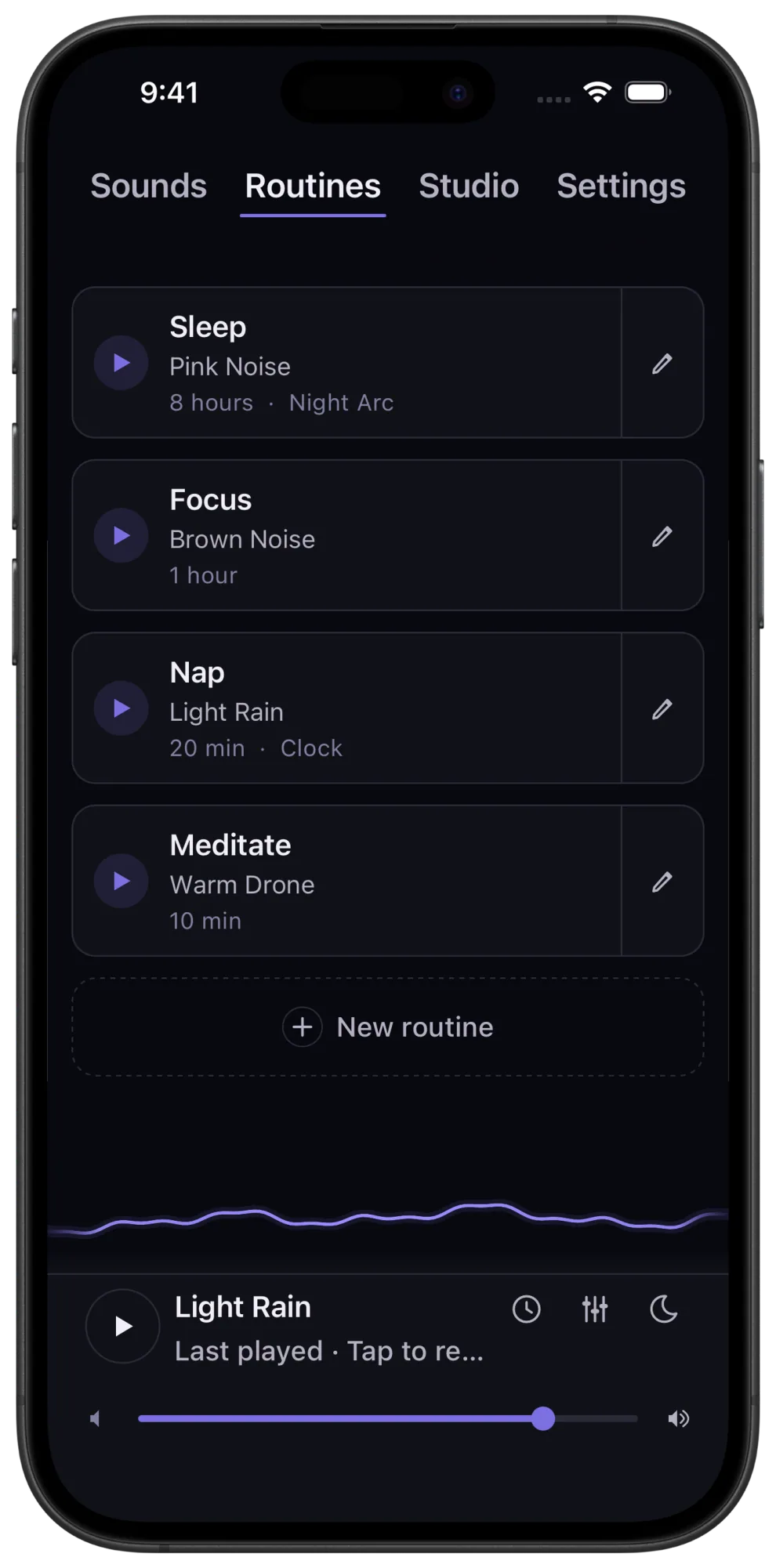
Four routines to start with, free
You can use all four unchanged starter routines without Premium. Each includes a sound, a duration and a gentle 30-second fade.
- Sleep: Pink Noise for eight hours, opening the Night Arc bedside clock view.
- Focus: Brown Noise for one hour, staying in the player.
- Nap: Light Rain for 20 minutes, opening the bedside clock.
- Meditate: Warm Drone for 10 minutes, staying in the player.
They give you something useful to try immediately. You can also listen to the free pink noise, brown noise and rain players in your browser before choosing a sound in the app.
Make a routine that fits you
With Premium, create a new routine or edit a starter. Choose your sound or mix, set its levels, pick a timer and fade, then choose whether to open the bedside clock. When you add a library sound, the routine captures its current tuning from the player. Give the routine a name you will recognize next time.
For example, you might make a quiet pink-noise setup with an eight-hour timer for bedtime, and a brown-noise-and-rain mix with a shorter timer for work. Those are your choices to save, rather than settings to rebuild every time you open the app.
Starting a routine applies its saved setup and starts a fresh timer for its full saved duration. A one-hour routine gives you a new hour each time you start it. You launch it when you are ready to listen.
Create your sound. Save your setup.
Studio and routines work together. Use Veil Studio to create a sound of your own, save it with Premium, then select it in a custom routine. Add your volume, timer, fade and bedside screen to make it a complete listening setup.
That is where Veil's customization becomes an everyday convenience. You can spend time getting the sound right when you want to experiment, and get straight back to it when you want to rest.
What is free, and what needs Premium?
Sleep, Focus, Nap and Meditate play free when used as supplied. Creating custom routines, saving changes to a starter and playing custom or edited routines require Premium. Premium also unlocks the full sound library, mixing and saved Studio sounds.
Choose monthly or annual Premium, or buy lifetime access once. Your listening setup lives on your device, and Veil generates the sound offline, without recordings, ads or an account.
Your next setup starts with one tap
Get Veil for iPhone or Android and try the four free starter routines. Choose Premium when you want to save your own sounds and settings together, with monthly, annual or lifetime access.